The last mile to data, automated. And every permission it gives, explained.
People ask for data where they found it. The request names the data and who approves. The owner decides in one screen. Access follows on its own, and ends on the agreed date.
No ticket, no chasing: once they ask, the owner’s yes is the only manual step. A service, not new software: we set it up in your systems and run it for you.
Every screen on this page is a demo for Halvane Industries, a fictional company. The people and data on them are made up.
Finding the data is the easy part. Getting access is where people get stuck.
Someone finds the data in the catalog, then has to work out who owns it, which approval it needs and where to ask. The request passes through a ticket queue, an approver who may not own the data, and an engineer who sets up the access by hand. The person asking follows up, then follows up again. And once access is granted, nobody writes down why, and nobody removes it.
| What goes unanswered | What it costs |
|---|---|
| Who do I ask? | Finding the owner means asking around. The request often lands with someone who does not own the data. |
| What do I ask for? | People file a ticket that says “I need sales data”, then wait while an engineer works out what to give them. |
| Where is my request? | It sits in a queue nobody owns. The only way to move it is to chase it. |
| Who agreed, and why? | The engineer who set up the access is on record. The person who should have decided, and the reason, usually are not. An auditor finds access nobody can explain. |
| When does it end? | Never, unless someone remembers to remove it. Access outlives the project it was for. |
The person asking has nothing to chase. The owner has nothing to look up.
The person asking for data
An analyst, a planner, a data scientist. They found the data in the catalog and need it this week.
- They ask where they found it. The way to ask sits on the catalog page, next to the data.
- They don’t have to find the owner. The request already knows who decides and what the access covers.
- They write the reason once, in their own words, and pick how long they need it.
- Nothing to chase. The owner hears about it the moment they ask, and gets reminders if it waits. Once the owner says yes, nobody sets up the access by hand.
The data owner who decides
The person accountable for a data set. Often a business leader, not an engineer.
- They don’t go looking. The request comes to them by email: who is asking, why, and for how long.
- They see what they are opening before they say yes: what the data covers, and whether the person needs all of it.
- They don’t have to remember to remove it. Every permission has an end date, and it ends on that date without anyone acting.
- They check who still has access once a quarter, in a review we run with them.
Your people ask, the owner decides. The rest runs itself.
It runs on Microsoft Entra, the sign-in your people already use. Each set of data people ask for becomes one request form in Entra, which Entra calls an access package. Each one has an owner who approves, a required reason and an end date. When the owner says yes, Entra puts the person in a group, and your data platforms give that group read access.
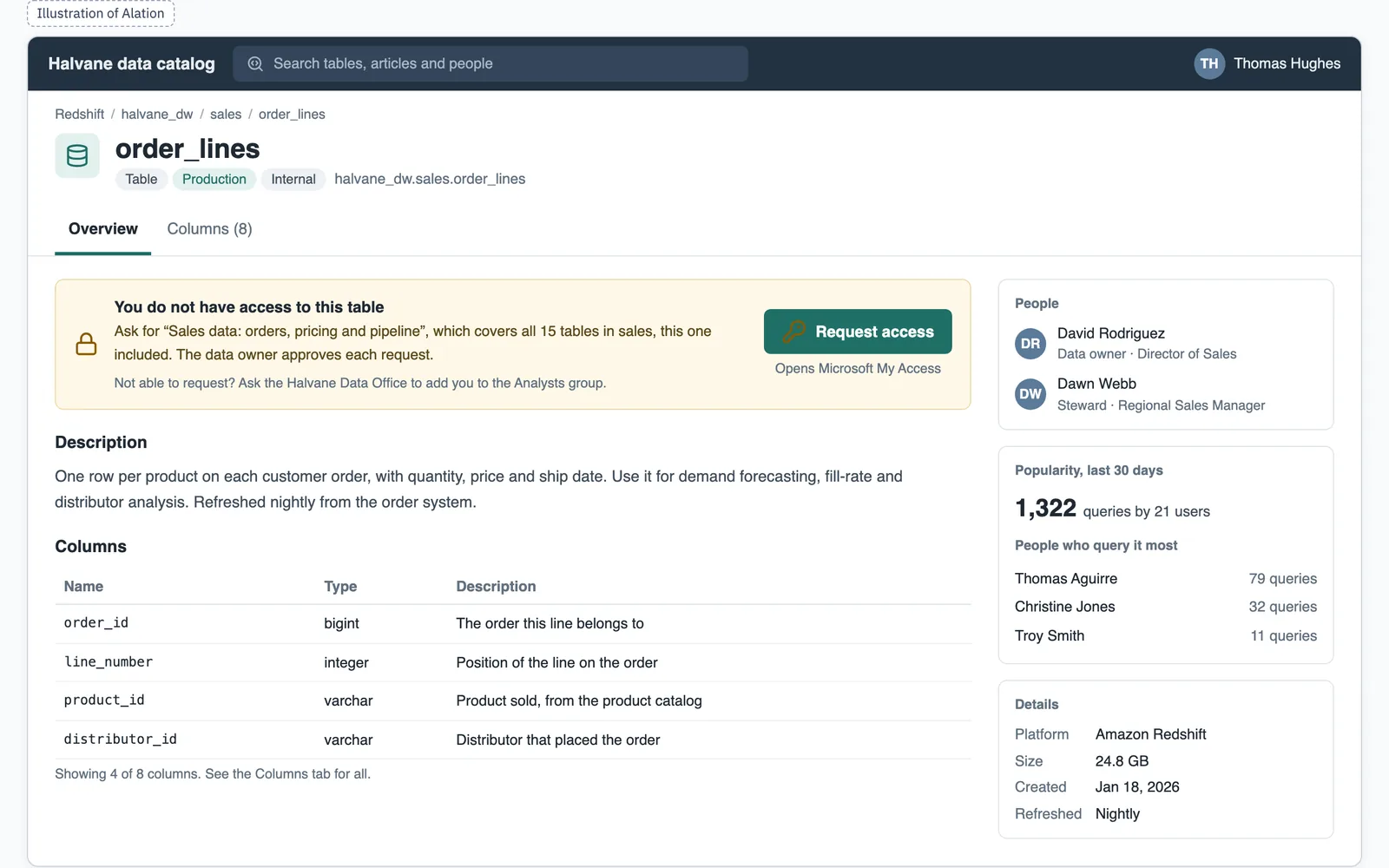
Request access on the catalog page opens the right request in Microsoft’s My Access, with the data and the approver already filled in.
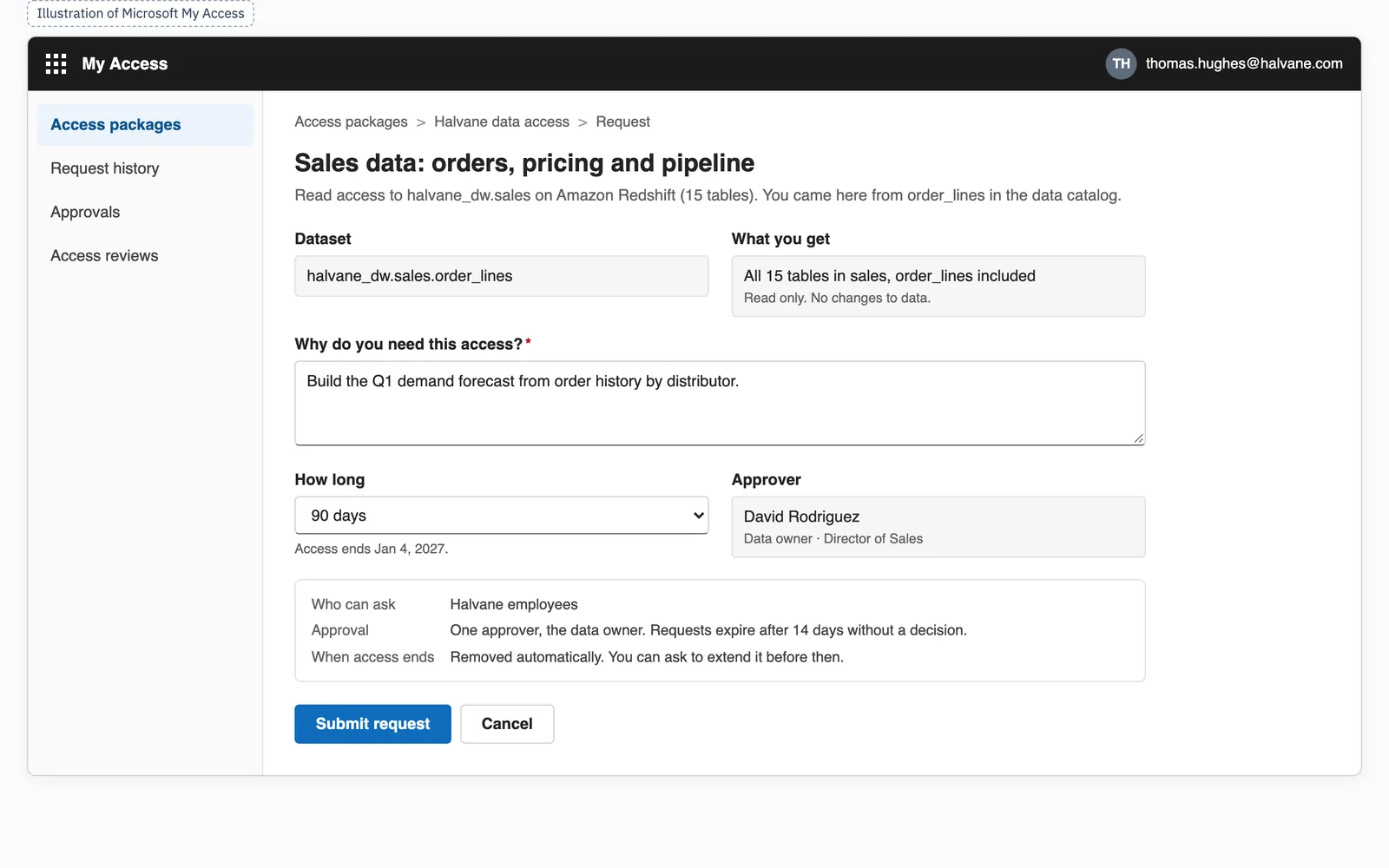
They write why they need it, say whether they need all the data it opens, and pick how long.
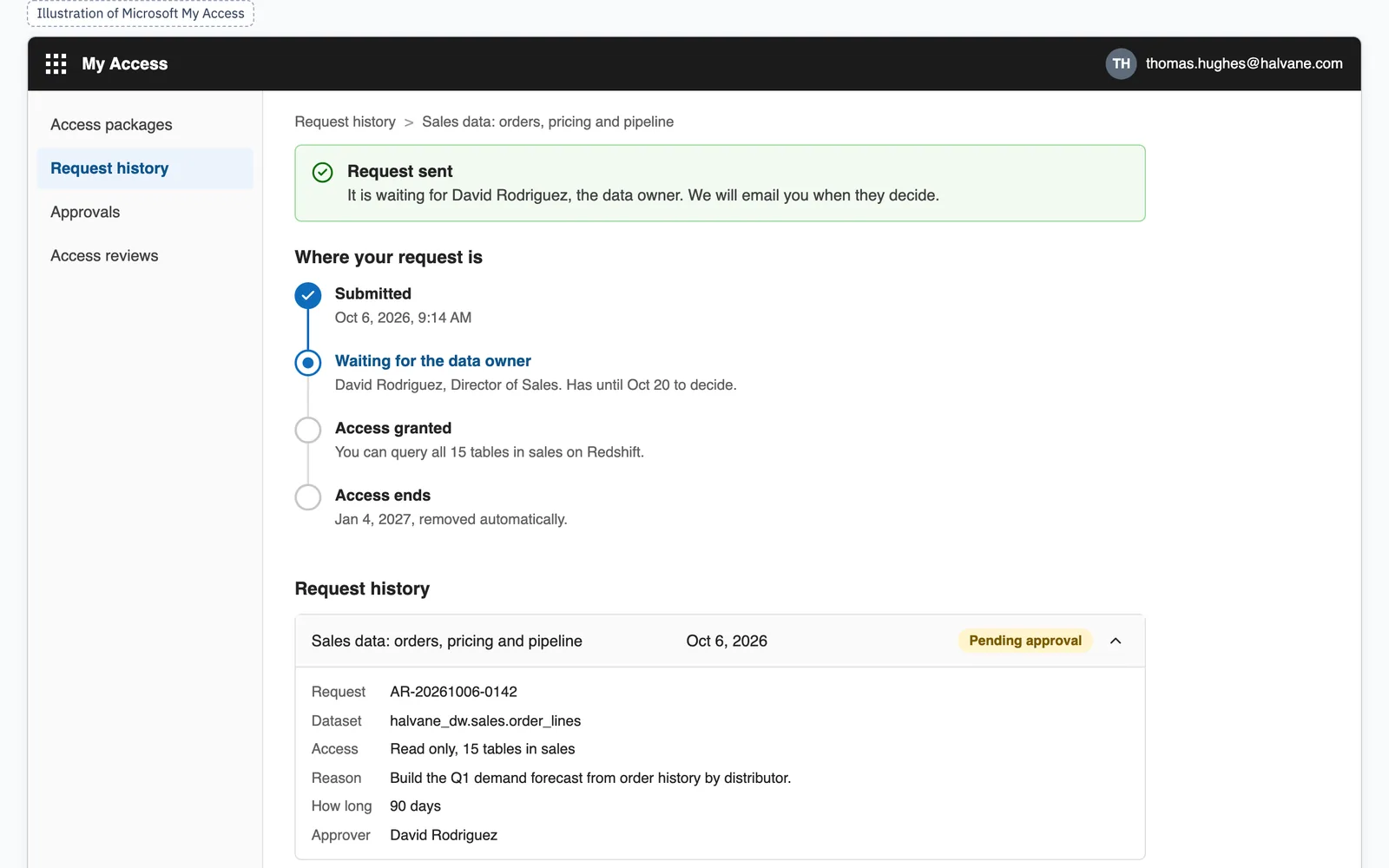
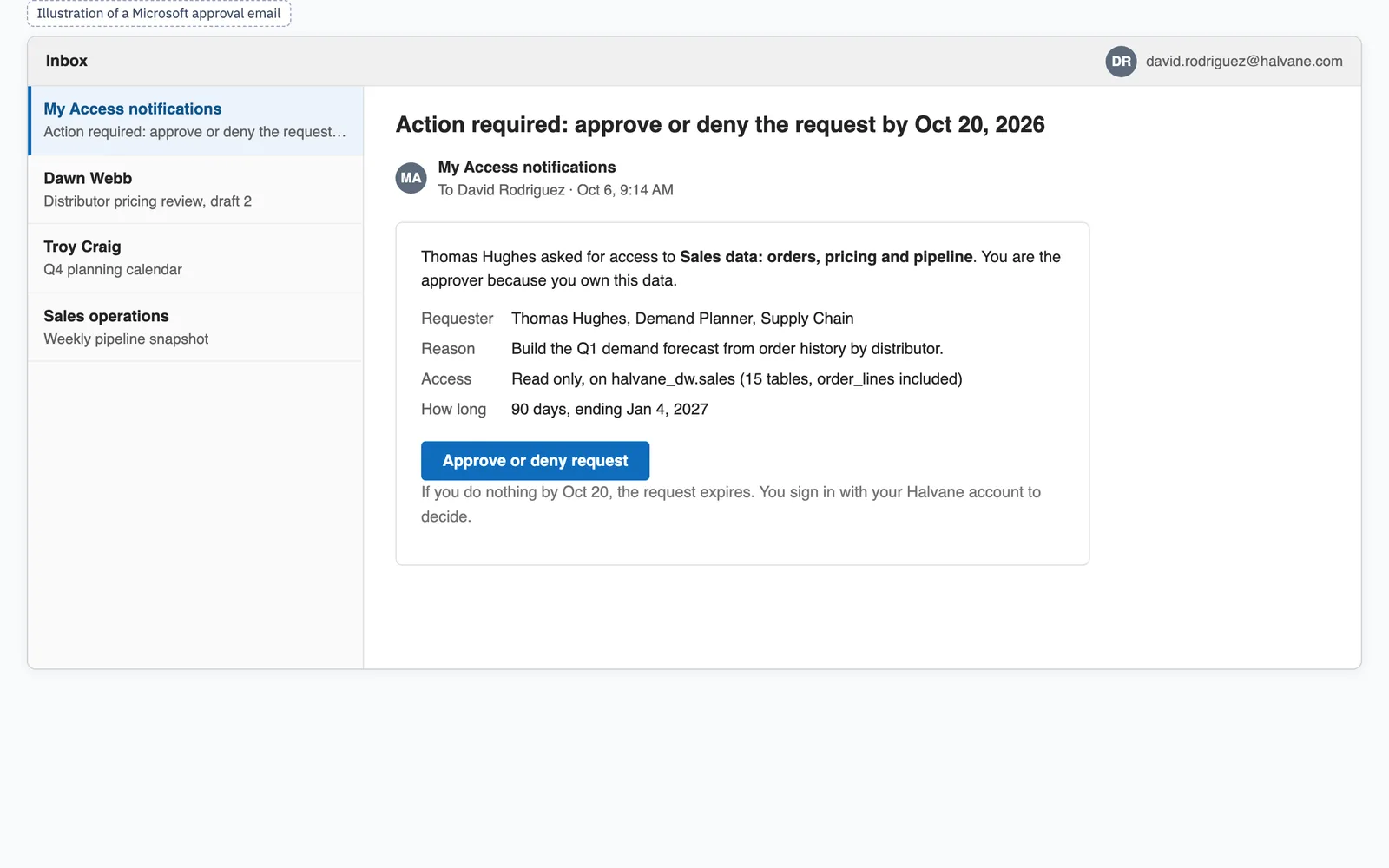
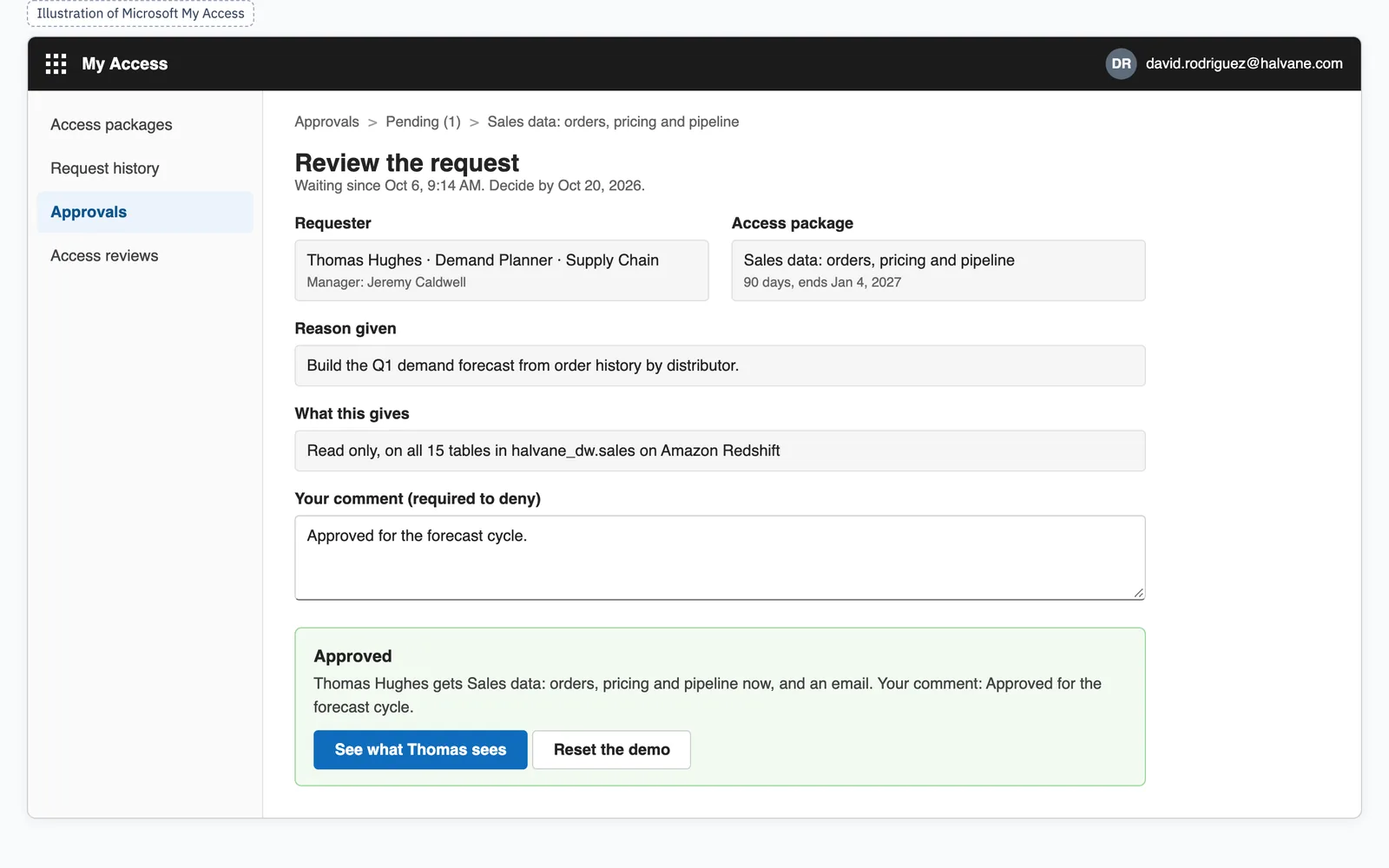
The owner gets an email from Microsoft, opens My Access and says yes or no.
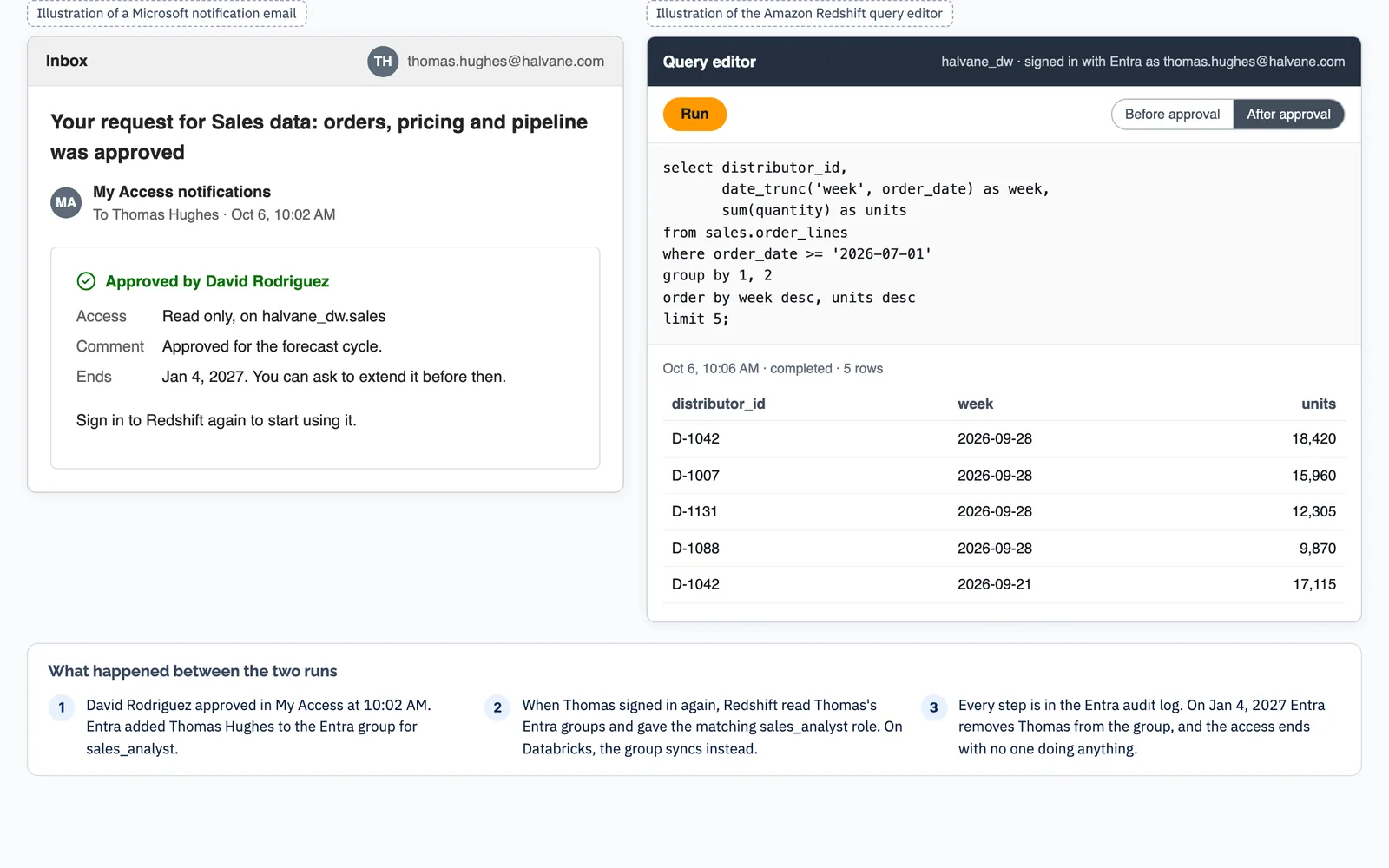
Entra adds them to the right group, and your data platforms let them in. Nobody sets it up by hand.
On the end date, Entra takes them out of the group. Nobody has to remember.
Data catalog
Request access on the table
My Access
Why, how much, how long
Data owner
Gets Microsoft’s email, decides in My Access
Access package
One per set of data: owner, reason, end date
Entra group
In on the owner’s yes, out on the end date
Entra writes down each request with its reason, each yes or no, and each removal, as it happens. A request nobody answers expires, so nothing waits forever. Entra keeps that log for 30 days; to keep it longer, it goes to storage you own.
One request, from first click to first query
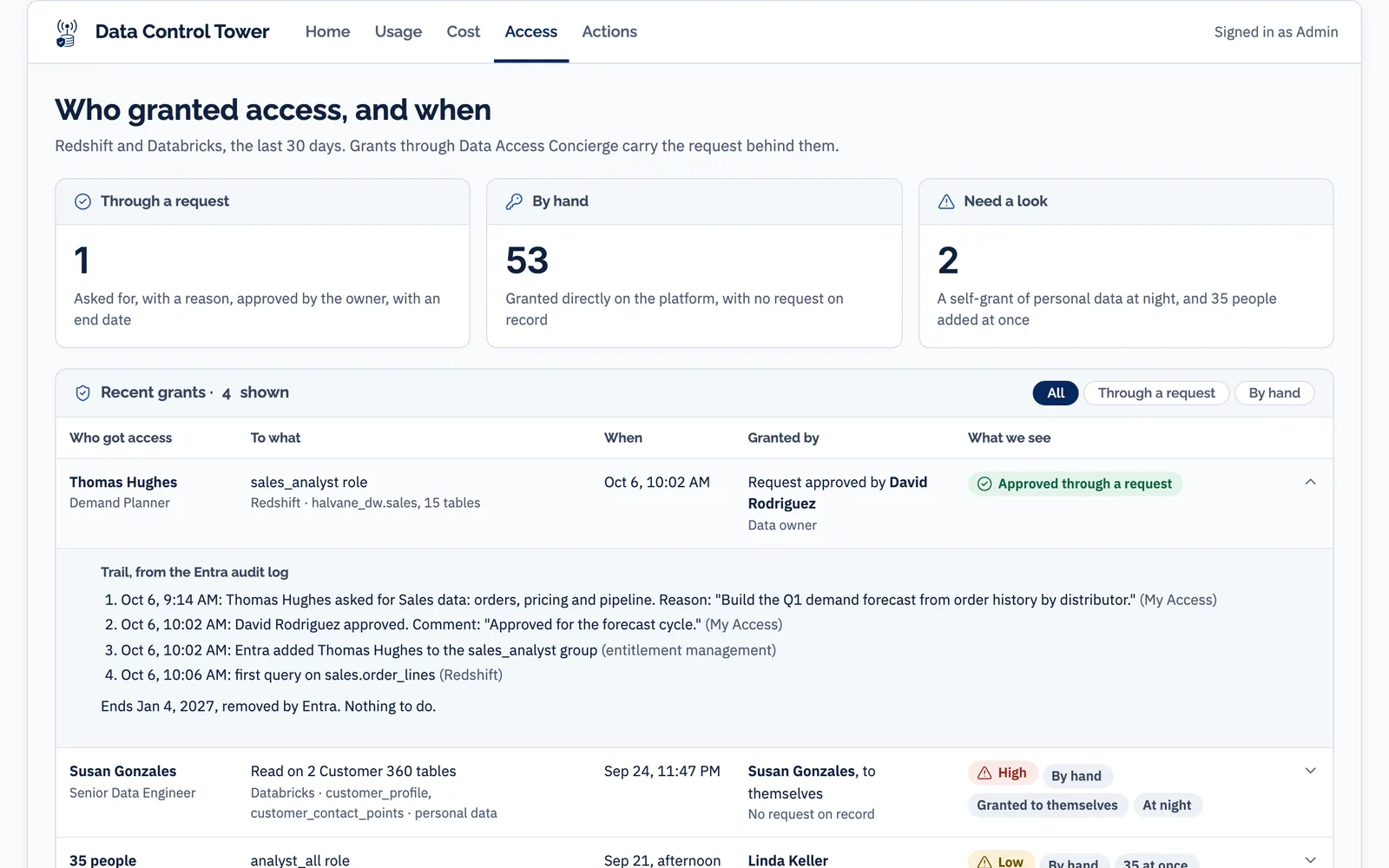
Halvane Industries is a fictional company. Thomas Hughes, a demand planner there, needs order history for a forecast. David Rodriguez owns the sales data. Six screens follow Thomas’s request from his first click to his first query. The seventh shows what the optional Data Control Tower adds.
Pairs well with the Data Control Tower. A separate Data Meaning product, sold on its own, that lists every access change and who made it, across your data platforms. The Concierge works fully without it. See the Data Control Tower
It runs in your own systems. It installs no software of ours.
There is nothing of ours to install. We switch on Microsoft’s own features in your Entra tenant, written as code your team can read, and set up the permissions on each data platform. When we finish, what runs is Microsoft Entra and your own data platforms.
Up to 10 roles, worked out with your data owners. Each covers one set of data, has one owner, and carries a name people recognise, like “Sales data: orders, pricing and pipeline”. Read access only; write access stays with your engineers.
One per role. Each sets who approves, who may ask and how long access lasts. It asks for a reason, and whether the person needs all of it.
Databricks and Redshift linked to the Entra groups, with the permissions each role needs. We test each one end to end before go-live.
A Request access link on each table page in Alation that opens the right request. Alation has no request button for tables, so the link sits in a custom field on the page.
A pass-or-fail checklist we run before go-live: a request, a yes, a no, a query that works, and access that ends. Your governance lead signs it off.
A plain-language guide for your governance lead, and a week of close support after go-live.
| Your identity and security teams will ask | The answer |
|---|---|
| What do you install? | No software. We set up access packages, groups and policies in Entra as code your team can read (Terraform or Microsoft Graph), plus a permissions script for each platform. |
| Who can ask for access? | Only people in a group you name. That group also sets how many ID Governance licenses you need. |
| How fast does access arrive? | Databricks documents that it picks up a new member within about 5 to 40 minutes of their next activity. Redshift applies it at their next sign-in. |
| How fast does it end? | On the end date, Entra takes the person out of the group. Databricks follows on the same timing. Redshift drops the role at their next sign-in. Amazon does not say when an open session loses it, so we test that in your setup. |
| How long is history kept? | Entra keeps its audit log for 30 days on P1 and P2. To keep it longer, it is exported to Azure Monitor or a storage account you own. |
| Does the approver approve inside the email? | Microsoft does not document that. Its email links to My Access, and the owner decides there, signed in with their work account. |
A fixed price to set up, and a capped monthly service
Designed, built, handed over
- About 5 weeks, then 1 week of close support after go-live
- Up to 10 roles, designed with your data owners
- One Databricks metastore and one Redshift cluster, with Redshift signing in through Entra
- The request forms in Entra, the permissions on each platform and the catalog links, all tested end to end before go-live
Service subscription
- Up to 10 hours a month
- Up to 2 role or dataset changes a month: a new role, a schema added, a new approver
- A quarterly access review with your data owners
- Fixes when access does not arrive or does not end
- A monthly health check and a one-page summary
Renewal
- The same service, with the same 10-hour monthly cap
- Role and dataset changes, quarterly reviews, fixes, health checks and the monthly summary
Work beyond the cap is $126 an hour, agreed with you before it starts. It is a service subscription, not a license: no Data Meaning software runs in your tenant. Not included: your Microsoft Entra licenses (P1 or P2, plus ID Governance) and the Data Control Tower, which is priced separately.
What you need, and when it is not for you
You need
- Microsoft Entra ID P1 or P2 in your tenant
- Microsoft Entra ID Governance licenses for everyone allowed to ask, not only those who do. Naming a group of requesters keeps the count down
- Databricks with Unity Catalog, identity-federated workspaces and automatic identity management, which is on by default for accounts created after August 1, 2025
- Amazon Redshift provisioned clusters that sign people in through Entra, or can be set up to
- Alation as your data catalog, for the Request access link on each table
- A named owner for each set of data, and a short list of what people ask for most
It is not for you if
- Your people do not sign in with Microsoft Entra. Every step runs on it
- You cannot license ID Governance for everyone who should be able to ask
- Your Redshift is Serverless, or people only query it in Query Editor v2. Ask us first: Entra’s direct sign-in is not confirmed there, so we would use AWS IAM Identity Center, quoted separately
- You want masking or row-level filters. It gives and removes access; it does not change what that access shows
- You want to find the access people already hold. That is what the Data Control Tower does
What leaders ask us first
We already have a data catalog.
Do we need the Data Control Tower too?
Why pay for licenses for people who never ask?
What if the data owner never answers?
One request can open a lot of data. Does the owner know?
Why a monthly service? Just set it up.
Close the last mile on the data your people ask for most.
We’ll walk you through one request in a demo, from first click to first query. Then we’ll pick the data your people wait on most, and start there.
Data Meaning is an independent consultancy. Microsoft Entra, Amazon Redshift, AWS, Databricks and Alation are trademarks of their respective owners.