Is your data used, and is access under control?
Your catalog lists the data you have. Data Control Tower shows what happens to it on Amazon Redshift and Databricks: who uses which data and how much, what for, what it costs, whether access is under control and where it changed. Every view ends in ranked actions. It will run read-only inside your own Azure subscription.
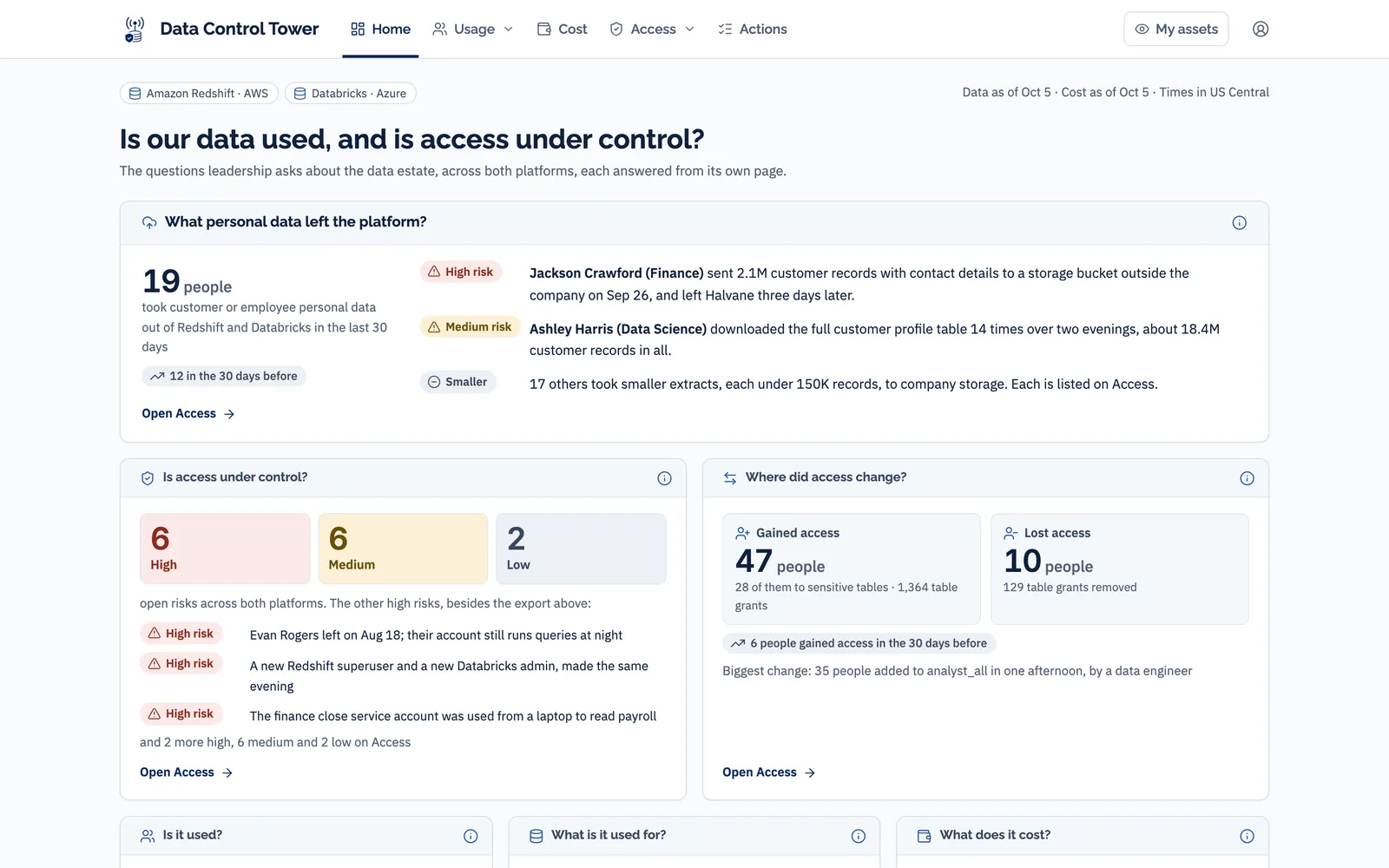
Every screen on this page shows Halvane Industries, a fictional company built for demonstration. The people and numbers on them are made up.
A catalog says what data you have. It can’t say what happens to it.
| What goes unanswered | What it costs |
|---|---|
| Who uses what, across both platforms? | Each platform’s own screens stop at its edge. Nobody sees Redshift and Databricks as one estate, so nobody sees it whole. |
| What does each person and department cost? | Neither platform shows dollar cost per person on a shared warehouse. Without it there is no chargeback, and no department owns its share of the bill. |
| Is sensitive data copied outside production? | A sandbox copy of a customer table keeps the data and leaves its access rules behind. Classification tools find personal data; they don’t say it is a copy of production. |
| Do people who left still hold access? | HR knows the end date. The data platforms don’t, so the account stays open until someone notices. |
| What do we fix first? | Findings sit in different tools for different teams, with no single ranked list and no named owner. |
What it looks like from the inside
The leader who has to answer for it
Usually a Chief Data and Analytics Officer, or the head of data governance.
- Governance is the priority, and the catalog is all they can show for it. It shows what exists, not how any of it is used.
- Nobody owns the bill. Service accounts often run much of the workload and belong to no department, so chargeback stalls before it starts.
- Access reviews are mandatory, and the evidence lives on two platforms and an HR file that nobody has joined.
- There is no list of what to do next. Remove a leaver’s access, or relabel the test copies of customer data, first?
The people who look after the data
Data owners and stewards. They don’t sign anything, but governance happens in their tables, one decision at a time.
- They hear about catalog edits, not about use. Nobody tells them who read their tables this month, or who just gained access.
- They approve access once and never see it again. A direct grant stays in place when the person moves teams.
- They don’t know their data was copied. A development table built from theirs carries the same personal data under a looser label.
- They have no list of their own. Findings about their tables land with somebody else, if they land anywhere.
Each tool answers one question for one audience
Lists what you have and, with query logs turned on, shows popular tables and top users, one table at a time. No cost, no access history, no leavers.
Free, and good within their walls. Each stops at its own platform, and neither shows dollar cost per person on a shared warehouse.
Shows who holds what, or runs the request-and-grant flow. It reads permissions, not use: it can’t say who actually read the data or what it cost.
Splits the bill by workspace or tag. None shows Redshift cost per person, and none looks at who can reach the data.
Data Control Tower reads the records Redshift and Databricks already keep, joins them to your HR file and your catalog, and sits beside the tools you own rather than replacing them.
Nine pages, one question each. Every one ends in an action.
Both platforms in one view: what left, what changed, what it costs, and the top action for each question.
Who uses the data by department and data area, the tables nobody reads, and people with access they never use.
What people do, with which tools, when, and which tables they combine by hand.
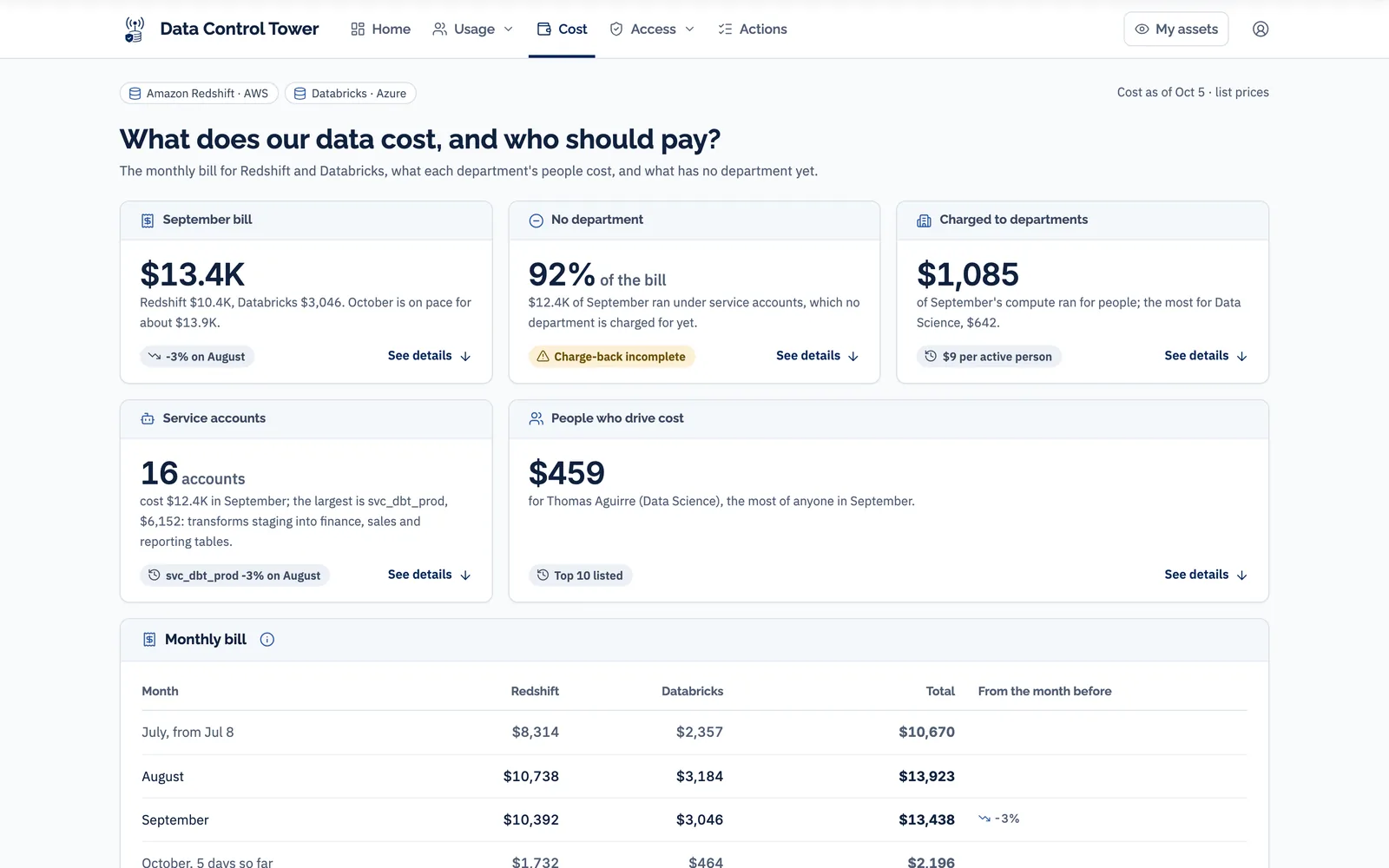
The monthly bill for both platforms, split by each person’s share of query time, and what has no department yet.
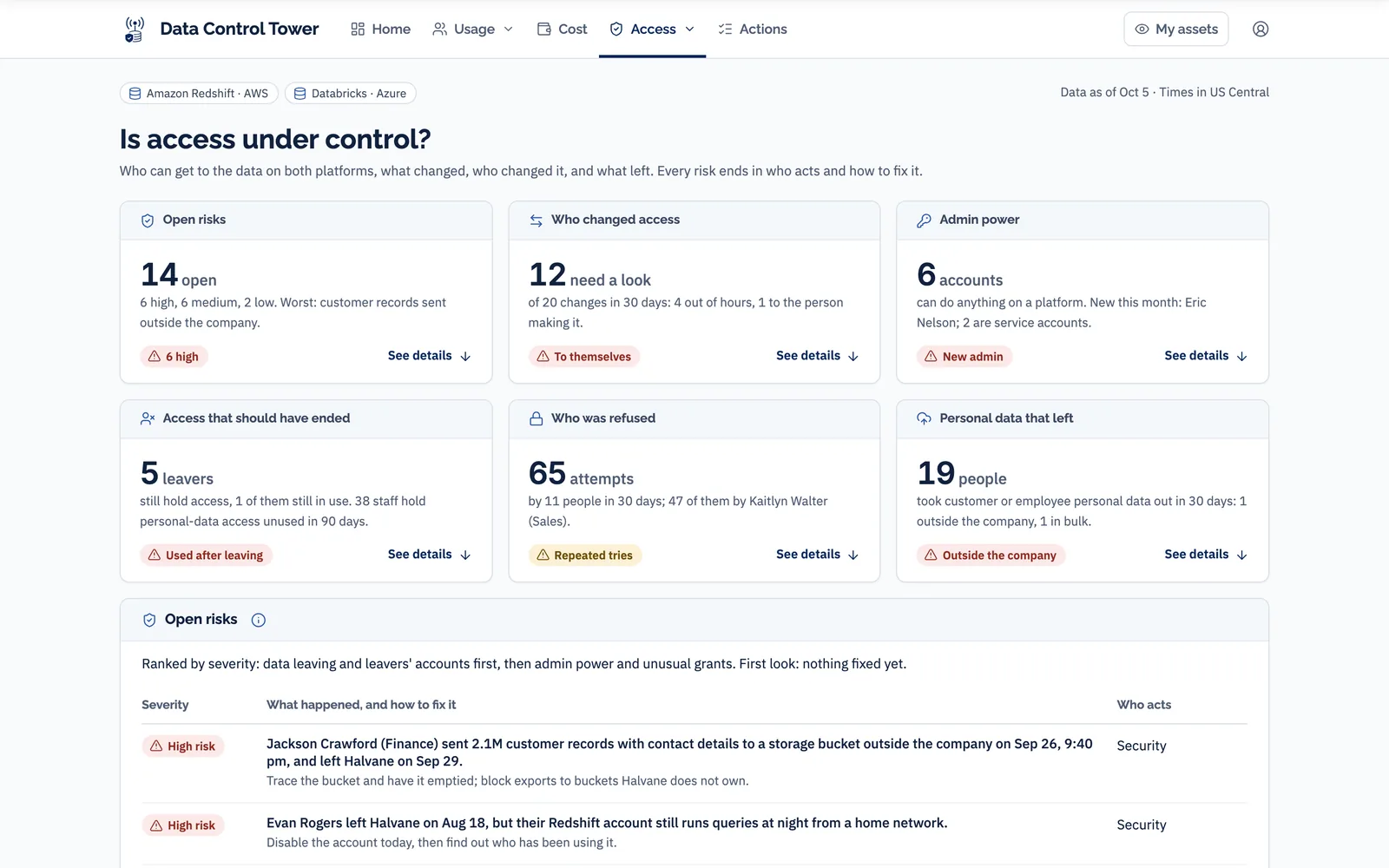
Leavers who still hold access, admin power, refused attempts, personal data that left, and every change with who made it.
What each one does and costs, and any a person opened from a laptop.
Personal and confidential production data copied into sandbox and development, and test tables nobody reads.
A page for each data owner and steward, covering only the tables they look after.
Every action from every page, grouped by who acts, ranked by severity, each with how to fix it.
You can also ask the same questions in plain words from Claude and get the number the page shows. Both read one shared set of definitions, so they can never disagree.
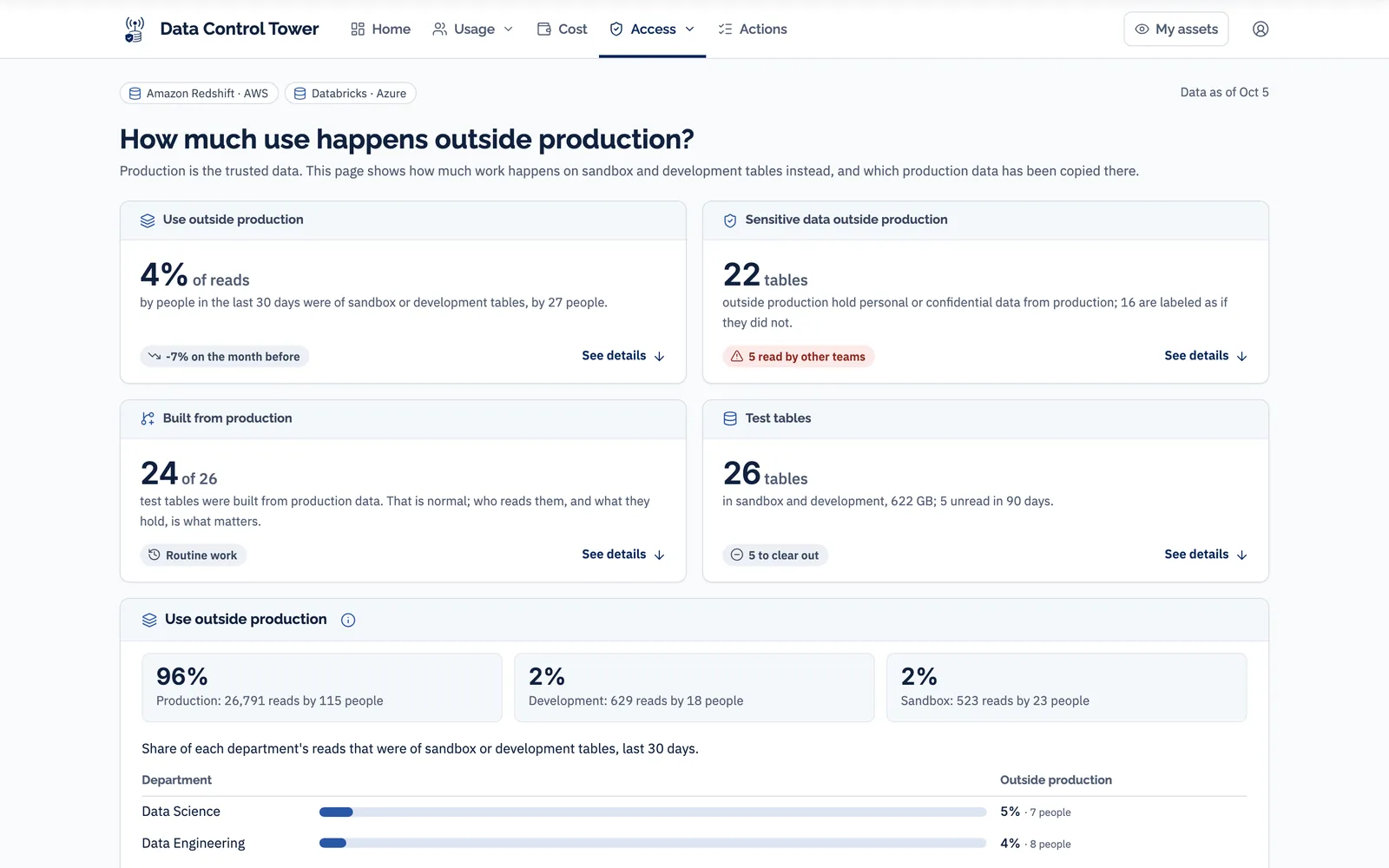
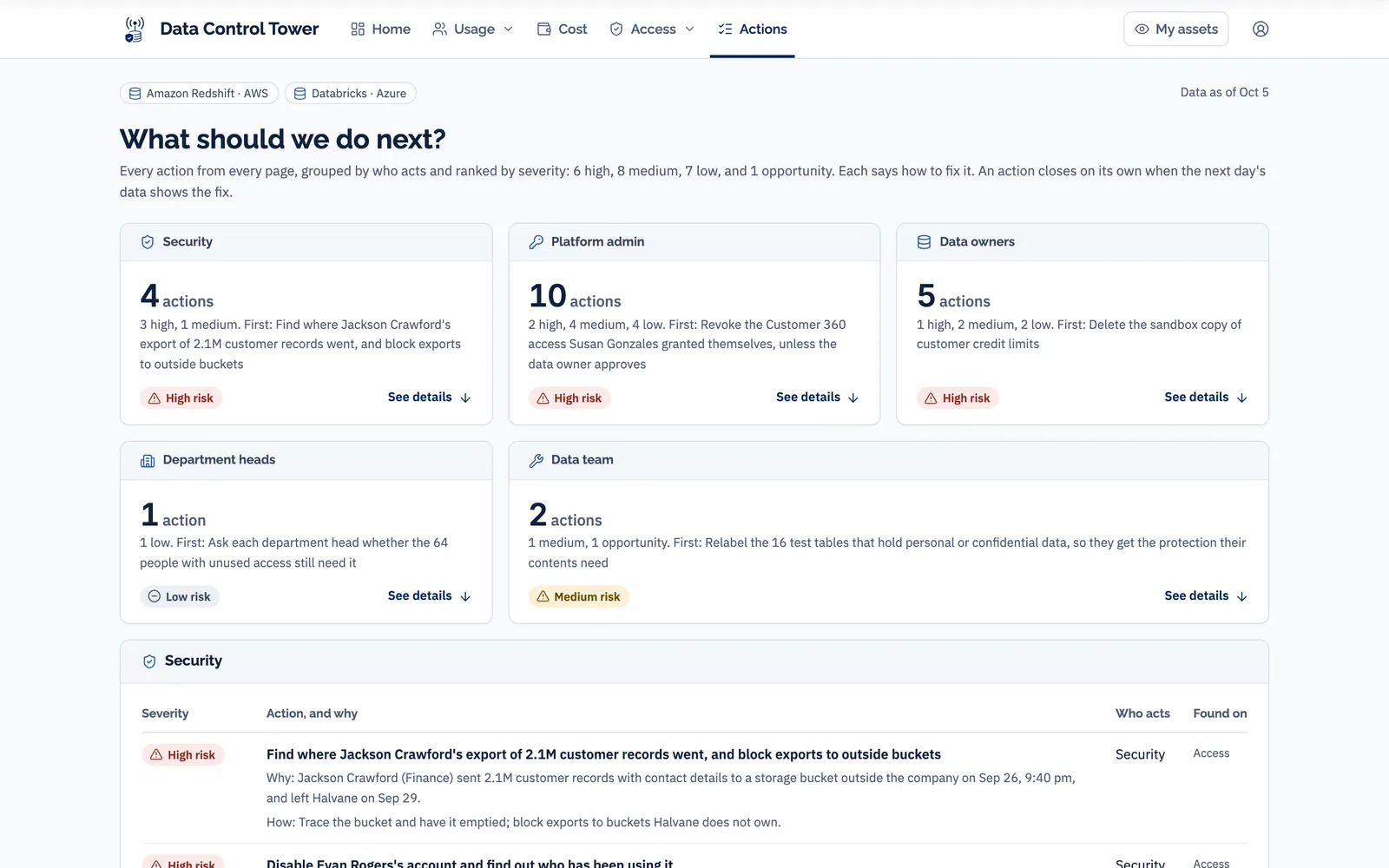
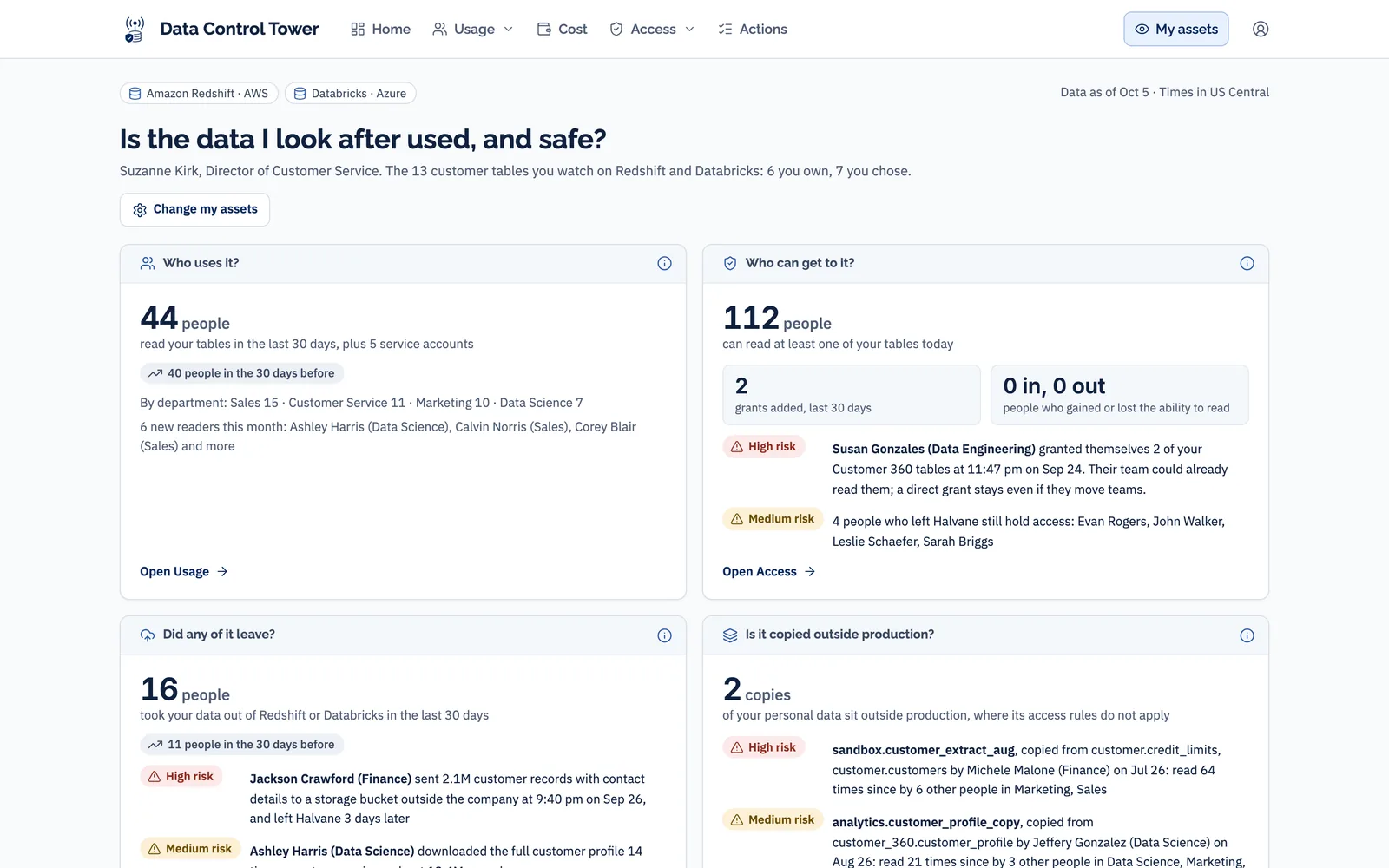
My assets: the data you look after, and what happened to it
Each data owner and steward signs in, picks the tables and views they oversee on either platform, and gets four questions about only those: who uses it, who can get to it, did any of it leave, and is it copied outside production.
- Across both platforms. One owner’s tables often live on Redshift and Databricks. The page treats them as one set.
- What changed. New readers, new grants and new copies of their data, with who made each one.
- Their own actions. What to approve, remove or relabel, with how to fix each, instead of findings landing with somebody else.
Built for data owners and stewards first. Other roles can be given the same view of the assets they are responsible for.
In your cloud. Read-only. Query text never kept.
Data Control Tower is in build. It will deploy into your own Azure subscription from a template your IT team can read before it runs, read the records Redshift and Databricks already keep once a night, and never write to either platform. The screens on this page are the approved design, shown with demonstration data.
Query text can carry customer values, so it is read only to find exports, grants and refused attempts, then dropped. What is kept is who, when, which tables, how many rows, and a fingerprint of the query with no values in it. All of it stays in your Azure subscription, encrypted at rest.
| Your security and platform teams will ask | The answer |
|---|---|
| Where does it run? | In your own Azure subscription. It will deploy from a template your team can read before it runs. |
| What can it change? | Nothing. It reads and never writes. On AWS, one read-only role that your admin creates with our script. On Databricks, read access to the system tables, granted by your admin. |
| Are platform passwords stored? | No. Redshift is read with your Azure identity, trusted by an AWS role, so no AWS key is stored and Redshift stays private. The only stored secret is your catalog’s token, in your Key Vault. |
| What is never kept? | Raw query text. It is read to find exports, grants and refusals, then dropped. |
| How much history on day one? | A full year from Databricks. Seven days from Redshift, unless your Redshift audit logging to S3 is on. Access changes are tracked from the day it is installed, on both. |
| How are people matched across platforms? | By email. Databricks matches automatically. For Redshift we suggest matches from the HR file and your admin confirms them once. Logins that don’t match stay visible as unmatched, never dropped. |
| Is cost per person exact? | No, it is an estimate, and the page says so. Each hour of a shared warehouse is split by each account’s share of query time. Jobs go to whoever they run as, service accounts to their owner, and idle time to its own line. Databricks is shown at list price, without your discount. |
How you buy it
Installed, connected, reviewed
- Data Control Tower deployed into your Azure subscription and connected to Redshift and Databricks
- People matched across both platforms and your HR file
- Your inputs set up: the HR file, catalog tags and production areas, service-account owners, and the storage you own
- All nine pages, and asking from Claude
- Four quarterly reviews
Renewal
- Continued use of Data Control Tower, refreshed every night
- Updates as Redshift and Databricks change
- Four quarterly reviews: what moved, which actions closed, and the next quarter’s top actions agreed
Prices are for Redshift and Databricks together. On one platform: $25,000 for year one and $12,500 a year after.
No software license fee. You pay your own cloud bill for the compute it uses. Fixing what the actions surface, such as access cleanup, chargeback setup or relabeling sensitive test data, is available as a separate project.
Access requests, raised from your catalog and approved by the data owner, are a separate optional service Data Meaning sets up alongside the product.
What you need, and when it is not for you
You need
- Amazon Redshift, Databricks, or both
- An Azure subscription to deploy into
- An HR file with each person’s department, manager, employment type, and start and end dates
- Catalog tags that mark personal data and production areas
- An admin on each platform to grant read-only access after install
It is not for you if
- Your data runs only on Snowflake, BigQuery or SQL Server today
- You want pipeline health or data quality monitoring
- You want a tool that blocks exports or masks data. It shows and ranks; it does not block
- You want it to change grants for you. It reads and never writes
What data leaders ask us first
We already have a data catalog.
AWS and Databricks already show some of this.
Our security team already has a tool for this.
Is this for the data office or for security?
Our IT won’t let an outside firm install something in our cloud.
Why quarterly reviews? Just give us the software.
See what happens to your data, not just what you have.
Bring last month’s Redshift and Databricks bills. We’ll walk you through the demo and what Data Control Tower would show for your estate.
Data Meaning is an independent consultancy. Amazon Redshift, AWS, Databricks and Azure are trademarks of their respective owners. Claude is a product of Anthropic, PBC.